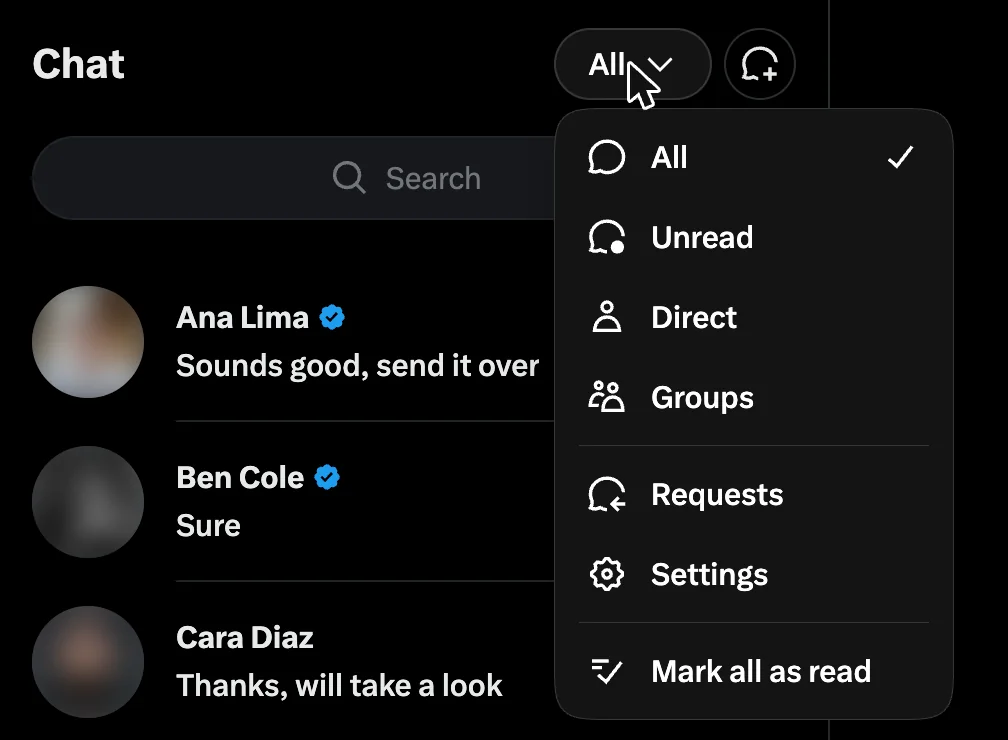
Message requests live under Requests in your Chat inbox, split into two tabs. On x.com they are called Message Requests and Other. In the apps, Priority and Hidden. Can't receive requests at all? Your DMs are closed. Set Allow message requests from to Everyone.
- A request is a DM from someone you do not follow. Media stays hidden until you accept.
- Grok sorts requests into Priority or Hidden. Many people never open Hidden.
- The sender gets no read receipt until you accept.
Checked September 2026 against X's own help pages and the live x.com screens.
I read the Requests folder as a sender and as a receiver most days. Our software sends first messages to people who do not follow the sender.
Where to find message requests on Twitter (X)
| On | Taps | The two tabs |
|---|---|---|
| x.com | Chat, then the All menu at the top, then Requests. | Message Requests and Other. |
| iPhone and Android | Messages, then Requests. | Priority and Hidden. |
Same two boxes, two sets of names. X's help page uses the app names.
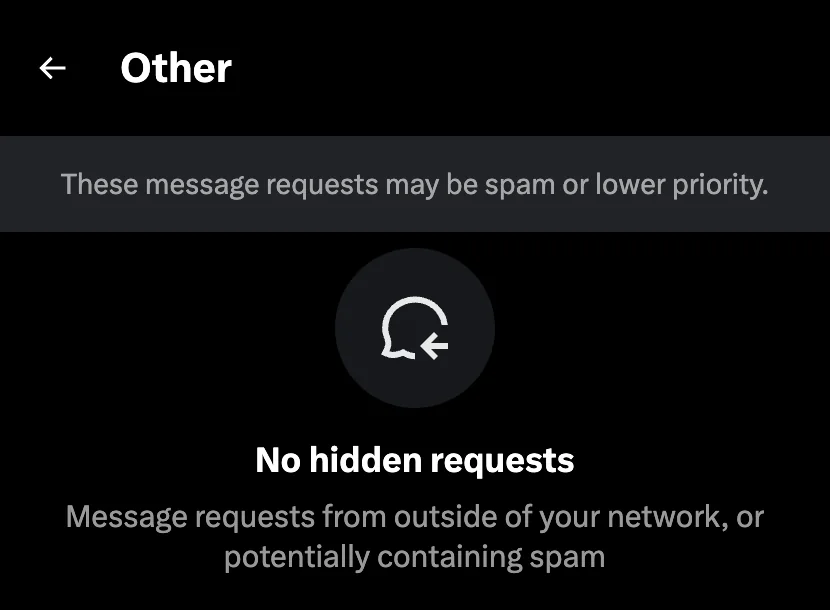
Inside a request: you get Accept or Delete. Photos, videos and link previews stay hidden until you accept. The sender cannot tell you opened it.
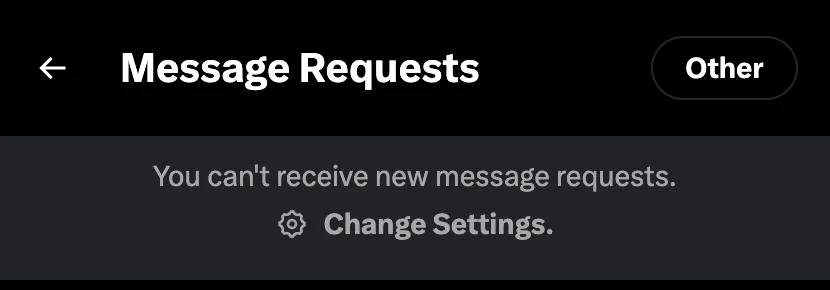
Why is the Requests folder missing?
Your DMs are closed. In the apps the Requests entry only exists when your account accepts messages from people you do not follow. On x.com the page stays, with a grey banner: "You can't receive new message requests. Change Settings."
Two other places a request hides: the Hidden tab, and behind the quality filter. That filter is on by default on the apps and sends no alert.
One exception: chats that existed before you closed your DMs stay open.
How to open DMs on Twitter to everyone
- Open Settings and privacy. On x.com it is under More. In the apps, under your profile picture.
- Tap Privacy and safety, then Direct Messages.
- Under Allow message requests from, pick Everyone.
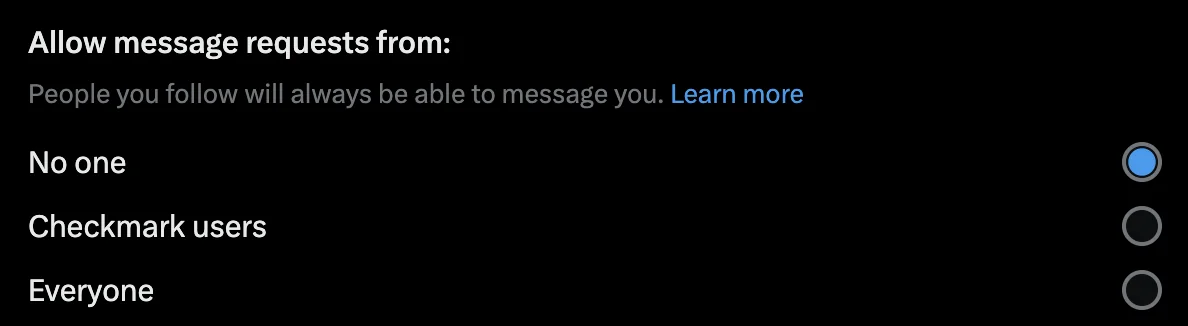
In the apps the switch has its own name. iPhone: Allow messages requests from everyone. Android: Receive messages from anyone. Both per X's help page. New accounts sometimes have it on already.
The choices on that screen
| Setting | What it does | Pick it if |
|---|---|---|
| Everyone | Anyone can send a request. | You sell, hire, or want inbound leads. |
| Checkmark users | Only accounts with a check can start a chat. People you follow always can. | You want fewer requests. |
| No one | Nobody new can write to you. Open chats stay open. | You want no inbound at all. |
| Quality filter (apps only) | Hides requests X rates as low quality, silently. | You get a lot of spam. |
| Show read receipts (apps) | Senders see when you read an accepted chat. On by default. | Turn it off if you read without replying. |
For a business account, the first row is the right pick. Every lead the second row turns away is a lead you never hear from.
Can you delete message requests in bulk?
X's help pages describe no bulk delete control, so check what your app offers. Work one tab at a time: Hidden first, then Priority by hand, because real leads land there too.
A deleted request tells the sender nothing, and X says it does not stop them writing to you again. Block the account if you want that.
Your own cold DM, from the other side
Your first message is a request. It shows no media until they accept, you get no read receipt, and Grok decides whether it lands in Priority or Hidden.
From what we see, three things push it into Hidden:
- A link in the first message.
- The same text sent to many people.
- Bursts from a new account.
X also caps first messages to strangers: 7 a day on a free account, 35 on Premium. Whether you can send at all depends on their setting: DMing someone who does not follow you. For a first line that reads well as a request: our cold DM scripts.
Xsender writes to that cap. It sends each account's share for the day and no more. It remembers who you already wrote to, and ends the follow-ups the moment a reply lands.
Do this today: open Settings and privacy, then Privacy and safety, then Direct Messages. Read which box is on. That one setting explains most missing requests.
FAQ
How do you check message requests on Twitter?
On x.com, open Chat, open the All menu at the top of the list and pick Requests. Then look in both tabs, Message Requests and Other. In the iPhone and Android apps, open Messages, then Requests, and check Priority and Hidden. If Requests is missing, your DMs are closed to people you do not follow.
Can I turn message requests off on X?
Yes. Under Settings and privacy, Privacy and safety, Direct Messages, set Allow message requests from to No one. Nobody new can write to you, but chats that already exist stay open. Pick Checkmark users instead if you want a smaller inbox without shutting it.
Does the sender know I read their request?
No. X sends no read receipt on a request until you accept it, and media stays hidden until then too. Once you accept, the chat behaves like any other, and read receipts apply if you have them on. Deleting a request tells the sender nothing.
Do message requests expire?
X's help pages describe no expiry. A request sits in Priority or Hidden until you accept or delete it, and a request from before you closed your DMs stays too. If one is missing, check the Hidden tab and the quality filter before you assume it was never sent.
Sources and method
Show the sources and dates behind this guide
Every claim above traces to one of these.
- Setting names, Accept and Delete, deletes, read receipts and the quality filter: X's Direct Messages help page, archived copy of 6 September 2026.
- The Grok sort and the request caps: X's help page on Chat, archived copy of 4 August 2026, confirmed live 10 September 2026.
- The DM rule: X's automation rules, marked updated April 2026.
- The x.com screens: read live on 10 September 2026 in Chrome, display language English. The apps were not checked by hand; their names come from X's help page.
- All of it was checked on 10 September 2026. The Hidden triggers are what we saw on our own accounts.
Written by Oscar Antana.
Sending first messages yourself? Start the 7-day free trial